AI Prompting Guide
Harnessing AI Tools for Creative Production
This guide now organizes AI creative tools into three distinct sections - Video, Image, and Audio - each with a brief introduction to its purpose and practical examples. You’ll find key apps highlighted with hands-on guidance, showing how to craft prompts for realistic voiceovers, music, visual content, and cinematic videos.
General Theme Across All Tools
All these AI tools share a common goal: enabling efficient, innovative, and visually compelling video content creation. They democratize creativity by providing:
- Ease of Use: Streamlined workflows for creators with or without technical expertise.
- Precision: Support for detailed prompts and camera control.
- Customizability: Options to control elements like lighting, scene composition, and movement.
These tools shine when users combine descriptive language with an understanding of cinematic techniques, creating content that aligns with their vision. The clearer and more detailed your prompt, the better the AI can understand what you want and deliver a result that meets your expectations.
Video Tool-Specific Insights
AI video tools enable the creation of cinematic sequences, animations, and dynamic motion. Learn to structure prompts, control camera angles, lighting, and pacing, and combine clips for storytelling.
Examples/Tools
- Luma AI / RunwayML / Kling AI / Veo:Specify scene, camera, and motion in prompts.
- Tips:"Cinematic wide shot of a mountain village at sunrise, soft lighting, slow pan, Pixar-style animation."
Image Tool-Specific Insights
AI image tools allow for generating, editing, and enhancing visuals with style, lighting, and composition control.
Examples/Tools
- FluxKontextPro / StableDiffusion3.5 / LeonardoImage: Use detailed prompts with perspective, mood, and textures.
- Tips:"Ultra-realistic portrait of a golden retriever puppy in a sunflower field, soft morning light, shallow depth of field."
Audio Tool-Specific Insights
AI audio tools help create TTS voiceovers, music, and sound effects with style, emotion, and mood control.
Examples/Tools
- 11Labs (TTS): Use keywords for emotion/styles: happy, sad, calm, energetic, dramatic.
- Lyria (Music): Compose tracks using style, mood, and tempo (per Google guidelines).
- LoudStream / RUMusic (SFX): Layer ambient or action sounds; e.g., "Thunderstorm with heavy rain, distant thunder, soft wind."
What is [agent]?
[agent] is your prompt helper.
- It helps you write better prompts inside the app. You don’t need to go to ChatGPT or Gemini.
- You just tell [agent] what you want, and it helps you.
Why use [agent]? (3 reasons)
1️⃣ Better results
- [agent] understands rules better and gives clean, high-quality prompts.
2️⃣ No extra talking
- You can tell it: “Reply with prompt only”
- So you get only what you need.
3️⃣ Easy for beginners
- You don’t need prompt skills.
- Just explain your idea in simple words.
Always put [agent] at the start of the prompt.
- ✅ Correct: [agent] do something…
- ❌ Wrong: Please [agent] do something...
Prompt:
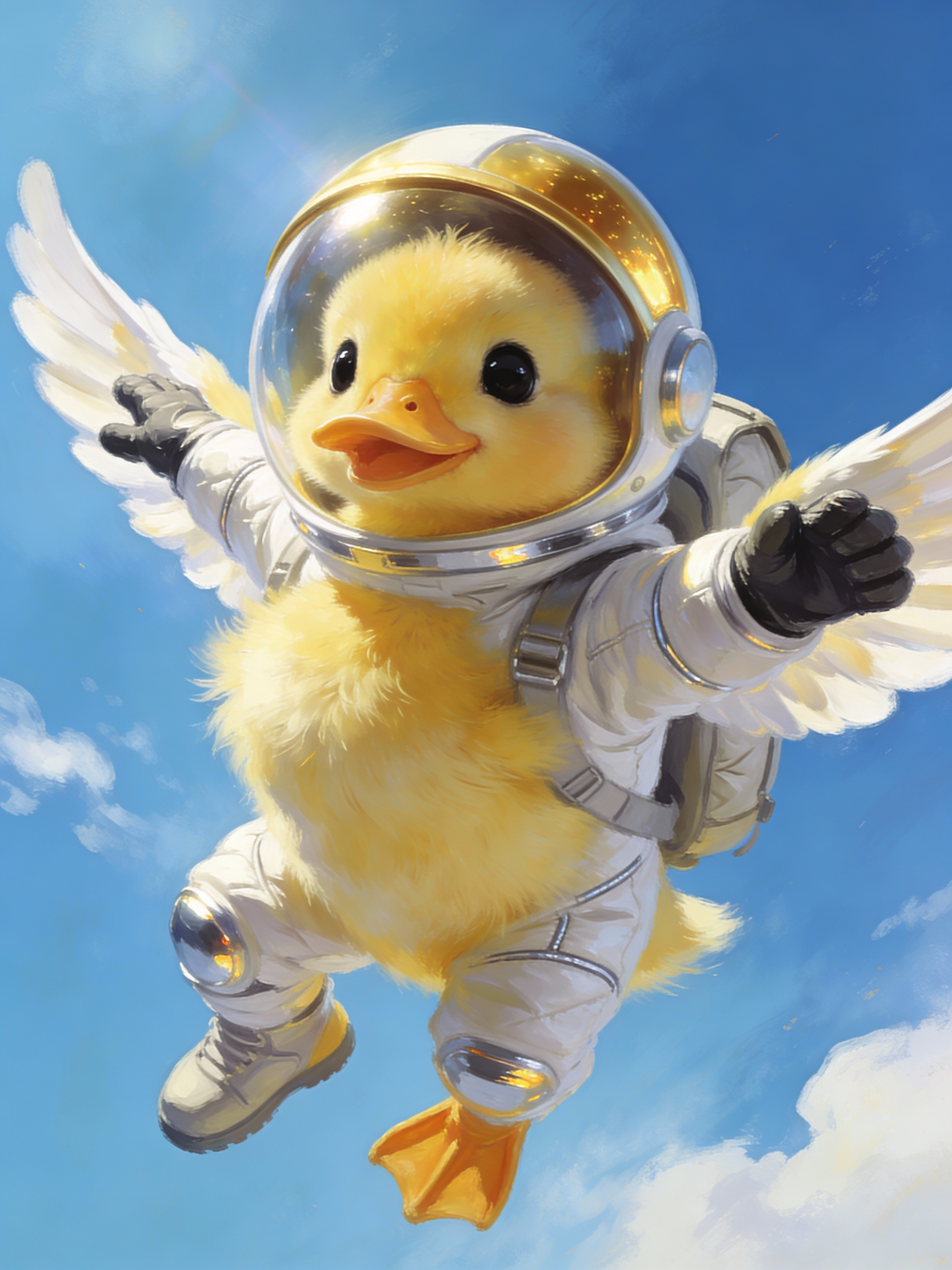
[agent] write image generation prompt A cute duck flying in the sky wearing a realistic astronaut suit.
Prompt updated by agent:
An adorable, small duckling with a cheerful expression and slightly ruffled feathers, flying with outstretched wings against a vast, clear blue sky. It's dressed in an authentic, high-fidelity astronaut suit, complete with a fitted helmet with a dark reflective visor, gloves on its wings, and a small backpack. The suit's fabric shows subtle wrinkles and highlights, indicating realistic material. A few fluffy clouds are in the distance. Digital painting, vibrant colors, expressive, high definition, fantasy art elements. * **Specific adjectives:** "fluffy yellow," "large, innocent black eyes," "meticulously designed," "highly realistic," "reflective chrome," "soft, wispy." * **Action verbs:** "soaring dynamically," "dotted," "illuminates," "peeking out." * **Realistic details for the suit:** "textured white fabric," "visible seams," "reflective chrome accents," "clear, slightly tinted gold visor," "realistic space boots," "fitted helmet," "small backpack," "subtle wrinkles and highlights." * **Details for the duck:** "fluffy," "large innocent eyes," "small webbed feet," "cheerful expression," "slightly ruffled feathers." * **Setting details:** "bright, cerulean blue sky," "soft, wispy white clouds." * **Lighting/Composition:** "Sunlight illuminates," "soft glow," "dynamic pose," "cinematic lighting." * **Art Style/Quality Modifiers:** "Photorealistic," "ultra-detailed," "sharp focus," "8k," "digital painting," "vibrant colors," "high definition.
Result: (see a result in public page)
Video Tool-Specific Insights
Veo 3.1 Advanced
Next-generation cinematic storytelling with Google’s Veo 3.1 — featuring ultra-consistent scenes, natural motion transitions, precision lip-sync, and enhanced audio blending. Create seamless videos with synchronized dialogue, ambient sound, and music — all generated in one unified flow.
Tips
- Focus on Visual Continuity
- Veo 3.1 Advanced connects moments across shots. Describe clear visual flow between scenes.Example: "A dancer twirls through a spotlight. The light fades and transitions into sunrise over a city rooftop where she finishes her pose in silhouette."
- Use Camera Transitions
- Integrate cinematic camera terms and scene bridges:Cross-fade, dolly out, tilt up, match cut, fade-through-color, seamless zoom.Close-up, wide shot, slow motion, dolly in, aerial view, handheld cam, tracking shot.Example: "Camera dolly-out from a tight close-up of a painter’s brush, cross-fading into a wide aerial of the completed mural."
- Describe Sound & Emotion
- Set tone with layered audio and emotion cues:Soft piano, urban ambience, thunderstorm, whispering wind, emotional crescendo.Example: "Rain pours as soft piano plays. A man says: I still remember her voice. Thunder rumbles, echoing his words."
- Show Realistic Motion
- Veo 3.1 handles natural physics and fluid animation.Add verbs that create movement:Running, spinning, drifting, falling, lifting, looking back, turning, breathing.Example: "The camera follows behind as she runs through the forest. Leaves scatter underfoot and her breath fogs in the cold air."
- Add Style & Consistency
- Choose your storytelling mood or art direction:Cinematic, photoreal, painterly, anime, retro, dreamlike, documentary.Example: "Dreamlike sequence — soft focus, glowing edges, ethereal lighting, lens flare drifts across the frame."
- Use Transitions (New in 3.1)
- Now supports smooth multi-scene continuity and sound-matched transitions:Fade-to-black, motion-match dissolve, synchronized audio cross-fade.Example: "The roar of a train fades into ocean waves as the scene transitions from a subway tunnel to a coastal cliff."
- Keywords to Include
- 4K, cinematic, volumetric light, shallow depth of field, natural shadows, dynamic motion, seamless transitions, audio sync, atmospheric, high consistency, soft focus, ambient score.
- Image-to-Video Tips. If using a photo:Describe motion only, avoid restating static elements.For sequential frames, specify start-to-end motion.Good Example: "Start frame: portrait of a woman gazing out a window. End frame: camera slowly pulls back as sunlight fills the room, blending with soft background music."
- Include Audio & Dialogue
- Add background music, ambient sounds, and speech for full realism.✅Correct: He says: Time waits for no one🚫Avoid: He says: “Time waits for no one”
- Need inspiration? Just start with this format:
- [Subject] + [Action] + [Scene] + [Camera] + [Mood] + [Audio] + [Transition]
Example Prompt:
- A man walks through a rainy street at night. Camera pans beside him, reflections shimmer on puddles. Jazz music and city sounds blend in the background. He says: I guess this is where it ends. The scene dissolves smoothly into sunrise over the same street, empty and silent.
Prompt Official Guide
Prompt:
A high-energy Japanese commercial where food is delivered by quirky characters in colorful maid costumes — like a group of cheerful grandmas dancing and twirling as they bring steaming bowls of ramen to your door. The scene is fast-paced, filled with neon text pop-ups, sound effects, and exaggerated reactions. The camera zooms on the delicious food, then cuts to the delivery characters striking silly poses with big smiles. Upbeat J-pop music and over-the-top announcer voice shout: 'Food delivered with love and style!'
Result: (see a result in public page)
Prompt:
In a glowing dreamlike scene, the golden retriever wags its tail and offers a bouquet of flowers. The Mona Lisa smiles warmly, gently tilts her head, and accepts the flowers with a soft laugh. Petals rise into the air, glowing as they swirl around both of them. The camera slowly circles, catching the dog’s happy expression and Mona Lisa’s rare, radiant smile. Gentle harp music and soft wind chimes create a magical, romantic mood
Result: (see a result in public page)
LUMA AI + LUMA Ray2
Tips & Prompting Stylie
- Ultra-Realistic + Cinematic Physics + Emotional Atmosphere.Best For: Real-world logic, lifelike texture, natural motion, subtle detail, grounded physics, and documentary or lifestyle scenes.
- Motion Description: Always clearly describe what’s happening, e.g. “A dog runs across a sandy beach and splashes into the water.”
- Use Real-World Detail: Describe setting and physical textures (e.g. “Wet cobblestone street reflecting neon lights,” “wood grain,” “soft sunlight through dusty air.”)
- Scale & Physics: Be creative with physical ideas: “A coin spins in slow motion on a glass table,” “Rain falling onto hot metal sizzles into steam.”
- Emotion & Vibe: “Warm, nostalgic lighting,” “peaceful vibe,” “slow and romantic.” Mood is as important as subject.
- Camera Movement: Include “slow dolly out,” “macro close-up,” “overhead drone shot,” “push in.”
Keywords
- macro close-up, dolly zoom, natural lighting, raindrops in slow motion, realistic physics, subtle facial motion, background bokeh, shallow depth of field, sunlight flares
Prompt Official Guide
Prompt:
A herd of wild oxen running fastly across a muddy desert away from lions chasing them.
Result: (see a result in public page)
Kling AI & Kling2
Tips & Best Practices
- Structure Your Prompt: Always include subject, subject description, subject movement, scene, scene description, and optionally—camera style, lighting, and atmosphere.
- Simple Action Language: e.g., “A knight walks through misty woods at dawn.” or “A woman walks through falling cherry blossoms.”
- Motion Control (Image2Video):, Combine subject + motion with background + motion. E.g., “A woman holds a cup of coffee, subtle steam rising, background of a rainy window.”
- Physics-Driven Events: e.g., “Raindrops splashing in slow motion”, “Book falling, pages flipping with wind.”
- 360 & Split-Screen: Use “360-degree spin”, “4 camera angles for 4 seasons”, or “multi-view split screen”
- Avoid Numbers: Use terms like “a group of birds” instead of “7 birds” for best results.
- Image2Video Tip: Describe motion explicitly, like “Mona Lisa slowly lifts sunglasses with her right hand.”
Keywords
- Camera Movements: Move Left, Move Right, Move Up/Down, Zoom In/Out, Pan (Vertical), Tilt (Horizontal), Roll Left/Right, Crane Up, Orbit Left
- Master Shots: Move Left and Zoom In, Move Right and Zoom In, Move Forward and Zoom Up
- Angles & Effects: “Low Angle”, “Eye Level”, “POV”, “Backlighting”, “Lens Flare”, “Neon Glow”, “Slow Motion”, “Dolly Zoom”.
Prompt Official Guide
https://ageofllms.com/ai-howto-prompts/ai-fun/kling-ai-promp-guidehttps://kling2.ai/guidePrompt:
Shot in medium range, with a blurred background and atmospheric lighting, a giant panda, adorned with black-rimmed glasses, is seen reading a book in a café. The book lies on a table, accompanied by a steaming cup of coffee, next to the cafe windows. Movie-level color palette.
Result: (see a result in public page)
Prompt:
Cat walking forward on the alien landscape, his tail swaying gently. A vibrant meteor shower fills the sky, with meteors streaking across.
Result: (see a result in public page)
RunwayML
Tips
- Use structured prompts i.e. organize Text-only prompts into [camera movement]: [scene setup]. [details].
- All prompts should be direct and easily understood, not conceptual (e.g. "a man vigorously typing on the keyboard" instead of "a man hacking")
- Prompts should be descriptive, not conversational or command-based (e.g. "a dog playfully runs across the field" instead of "can you make a video of a dog playing in the field" nor "add dog to the image")
- Prompts should use positive phrasing (e.g. use "a clear sky" instead of "a sky with no clouds", or use "the camera remains still" instead of "no movement")
Keywords
- Camera Styles: Use keywords such as "low-angle", "High angle", "Overhead", "FPV", "Hand held", "Wide angle", "Close up", "Macro cinematography", "Over the shoulder", "Tracking", "Establishing wide", "50mm lens", "SnorriCam", "Realistic documentary", "Camcorder".
- Lighting Styles: Use keywords such as "diffused lighting", "Silhouette", "Lens flare", "Back lit", "Side lit", "[color] gel lighting", "Venetian lighting".
- Movement Speeds: Use keywords such as "Dynamic motion", "Slow motion", "Fast motion", "Timelapse".
- Movement Types: Use keywords such as "Grows", "Emerges", "Explodes", "Ascends", "Undulates", "Warps", "Transforms", "Ripples", "Shatters", "Unfolds", "Vortex".
- Aesthetic: Use keywords such as "moody", "cinematic", "Iridescent", "Home video VHS", "Glitchcore".
- Text Styles: Use keywords such as "Bold", "Graffiti", "Neon", "Varsity", "Embroidery".
Prompt Official Guide
Prompt:
Low angle static shot: The camera is angled up at a woman wearing all orange as she stands in a tropical rainforest with colorful flora. The dramatic sky is overcast and gray.
Result: (see a result in public page)
Prompt:
Parallax camera movement of a woman on stage speaking, the camera orbiting around the stage as she subtly gestures with her hands while speaking.
Result: (see a result in public page)
Minimax Hailuo
Tips
- Prompt formula: Subject + Subject Motion + Scene + Camera Movement + Aesthetic Atmosphere.
- Precise Camera Movement: Detailed instructions like "The camera descends slowly, wrapping around to focus on the subject's face."
- Atmospheric Aesthetics: Specify ambiance with terms like "natural color tones" or "neon reflections in a bustling city."
- Transformation: Describe environmental changes, e.g., "A foggy forest clearing with light beams piercing through."
Prompt Official Guide
https://b6j6u5f4zf.feishu.cn/docx/T3iLdwLAToky3txGtVCcjMbZnQhPrompt:
mother and son looking at camera and smiling mother kissing child
Result: (see a result in public page)
Seedance
Tips
- Lead with movement: Use action verbs like twirl, leap, glide, spin, wave, stomp.
- Set the mood: Emotion and lighting define the feeling of the performance.
- Direct the camera: Describe where the camera is, how it moves, and what it captures.
- Use real-world lighting or stylized environments: Spotlight, neon glow, sunset, fog, etc.
- Balance detail and flow: 1 action + 1 emotion + 1 visual + 1 camera move = powerful prompt.
Keywords
- Dance Styles: Ballet, Hip-Hop, Contemporary, Salsa, Breakdance, Tango, Kathak, Freestyle, Flamenco, Street Dance
- Motion Verbs: Twirl, Spin, Leap, Slide, Pose, Stomp, Lock, Pop, Glide, Wave, Crush, Lift, Pulse
- Camera Movements: Orbit, Crane Up, Tracking Shot, Close-Up, Overhead Drone, Low Angle, Zoom In, POV, Dolly Back
- Lighting & Mood: Spotlight, Golden Hour, Neon Glow, Stage Lighting, Candlelight, Blue Ambient Light, Backlight, Red Mood Light
- Effects: Slow Motion, Rain, Fog, Dust Particles, Sparks, Firelight, Light Rays, Shadow Contrast
Prompt Official Guide
https://seedance.net/prompt-guidePrompt:
The leopard glides silently through thick jungle undergrowth, its sleek, spotted body low and poised. Each step is smooth and calculated, its sharp eyes locked ahead with predatory focus. The foliage reacts softly — leaves brushing aside, branches shifting under its weight. The camera moves low and steadily in a slow dolly backward, facing the leopard as it approaches with graceful intensity. Shallow focus shifts briefly highlight nearby leaves before snapping back to the leopard’s piercing gaze, framed by the tangled green.
Result: (see a result in public page)
Prompt:
Slow push-in shot on a group of young children playing football
Result: (see a result in public page)
PixVerse
Tips
- Add a descriptive text prompt and define the elements in your scene.
- Subject + Subject Description + Action + Environment
- Set emotional atmosphere like the mood or tone and give a proper reference style like cinematic or cartoon
Keywords
- Subjects, action words, settings, adjectives, moods, styles, lighting
Prompt Official Guide
https://docs.pixverse.ai/PixVerse-Prompt-Tips-Basic-Edition-e8770d46349e4536930d5a4fadecf9adPrompt:
A young, skilled pilot in the cockpit of their sleek spaceship, engaging in a daring dogfight with an enemy squadron near the looming epic space station. Description: The pilot's youthful exuberance is evident in their wide eyes and grin as they navigate the intricate maze of the space station's defense systems. The cockpit is a cocktail of futuristic gadgets and ergonomic design, showcasing the pilot's mastery over the spacecraft.
Result: (see a result in public page)
Prompt:
The dancer slowly raises their arms, twirls in dramatic lighting, and vanishes into mist.
Result: (see a result in public page)
Hunyuan
Tips
- Use this tool for good physical accuracy, high dynamics, and scene consistency.
- A compelling AI video prompt consists of 7 components:
- 1. Subject - define your star: "A young woman with flowing red hair", "A sleek electric sports car", "A majestic eagle in flight".
- 2. Scene - set your stage: "In a neon-lit cyberpunk cityscape", "Amidst a snow-covered forest at dawn", "Inside a minimalist modern apartment"
- 3. Motion - bring life to your video: "Gracefully dancing through falling autumn leaves", "Rapidly accelerating along a coastal highway", "Smoothly transitioning between yoga poses"
- 4. Camera movement - direct your shot: "Slow upward tilt revealing the cityscape", "Smooth tracking shot following the subject", "Dramatic circular pan around the scene"
- 5. Atmosphere - create the right mood: "Mysterious and ethereal atmosphere", "Energetic and vibrant mood", "Calm and serene ambiance"
- 6. Lighting - perfect your illumination: "Soft, warm sunlight filtering through trees", "Sharp, contrasting shadows from street lights", "Diffused, ethereal glow from above"
- 7. Shot composition - frame your vision: "Close-up shot focusing on emotional expression", "Wide landscape shot emphasizing scale", "Low-angle shot creating dramatic perspective"
- Use Evocative Language: e.g. use "Sun-drenched" instead of "A bright day", use "Surging," "Gliding" instead of "Moving quickly".
- Paint with Details: e.g. use "Ancient redwoods towering into misty heights" instead of "A forest", use "A Victorian mansion with intricate wrought-iron details" instead of "A nice house"
- Maintain Visual Consistency: Keep lighting conditions unified throughout the scene, ensure color themes work together, match mood elements across all scene components, maintain realistic physics and movement patterns.
- Write Clear, Direct Descriptions: Focus on concrete visual elements, describe exactly what should be seen, structure descriptions from main subject to supporting details, use precise spatial and directional terms.
Prompt:
A graceful ballet dancer in a flowing white dress. Inside a grand, historic theater with ornate golden decorations. The dancer performs a fluid pirouette, her dress creating circular patterns in the air. Camera slowly circles around the dancer, starting at eye level and gradually ascending. Dramatic spotlight from above creates a soft glow, while shadows dance across the stage floor.
Result: (see a result in public page)
Prompt:
A stylish woman walks down a Tokyo street filled with warm glowing neon and animated city signage. She wears a black leather jacket, a long red dress, and black boots, and carries a black purse.
Result: (see a result in public page)
Wan
Tips
- Quite capable open-source tool from Alibaba with good understanding for physics, adherence to prompts, and stunning videos especially in the anime category.
- Be descriptive to set the characters’ appearance, the background settings, and the desired motions.
Prompt Official Guide
Prompt:
Two anthropomorphic cats in comfy boxing gear and bright gloves fight intensely on a spotlighted stage.
Result: (see a result in public page)
Prompt:
Summer beach vacation style, a white cat wearing sunglasses sits on a surfboard. The fluffy-furred feline gazes directly at the camera with a relaxed expression. Blurred beach scenery forms the background featuring crystal-clear waters, distant green hills, and a blue sky dotted with white clouds. The cat assumes a naturally relaxed posture, as if savoring the sea breeze and warm sunlight. A close-up shot highlights the feline's intricate details and the refreshing atmosphere of the seaside.
Result: (see a result in public page)
Sora2
Tips
- Keep it short, vivid, and visual — imagine you’re describing a movie shot to someone holding the camera.
- Focus on who / where / what’s happening
- Use strong visual words — colors, lighting, vibe
- Add camera moves (close-up, wide, slow pan)
- Keep one clear action per shot
- Optional: Add emotion or cinematic style
Useful Keywords
- Camera / Motion / Environment / Lighting / Style / Emotion: close-up, wide shot, tracking, panning, walking, running, floating, neon-lit, foggy, rainy, forest, ocean, golden hour, soft light, cinematic, photorealistic, Pixar-style, magical, joyful, suspenseful, calm.
Write as if describing a movie shot. Keep it visual, emotional, and simple.
- [Subject + Action]
- [Environment + Mood + Style]
- [Camera + Lighting + Motion]
Prompt Official Guide
Prompt:
Two creators float in zero gravity inside a glowing space station with Earth and stars visible through panoramic windows. Holographic screens displaying Sora 2 features orbit around them. Person 1: "Sora 2 the motion, the lighting, it’s like nothing I’ve ever seen!" Person 2: "Totally! The realism, the cinematic angles.it makes every scene pop!" Camera angles: Close-up of Person 1’s face illuminated by holograms Medium shot of Person 2 pointing at floating holographic demos Wide shot showing both floating with Earth and stars in the background, Visual style: futuristic neon-blue accents, soft space lighting, reflections on visors, dynamic holographic motion.Duration: 6–8 seconds.
Result: (see a result in public page)
Kling 3
Kling 3.0 is designed to understand cinematic intent, shot sequencing, and motion direction rather than just listing objects. Think like a director: shots, camera movement, subject consistency, timing, and narrative flow.
Best Practices
- Think in Shots, Not One Block — Structure your prompt as individual shots with durations and descriptions that follow a narrative.
- Anchor Your Subjects — Define core subjects early with consistent descriptors so Kling maintains continuity across camera moves and different shots.
- Describe Motion Explicitly — Instead of vague verbs, describe how the camera moves and how the subject moves over time.
- Slow tracking shot following subject from left to right
- Medium shot, camera holds while subject pauses
- Push-in from wide to close with subtle focus shift
- Use Native Audio Cues — When you include dialogue or specific soundlines, tag the speaker and tone.Example: [Lead, calm voice]: “Welcome to our Iftar.”
- Take Advantage of 15-Second Duration — Kling 3 can generate longer sequences with evolving actions. Describe progression over time for smoother flow and fewer artifacts.
Keywords
- Scene setting, shot type (close-up, tracking), subject details, motion direction, camera behavior, emotional tone, lighting description, native audio cues, continuity, sequence instructions.
Prompt Official Guide
Prompt:
Shot 1 (0–3s): Wide cinematic drone glide toward an ancient desert ruin at golden hour. Wind moves sand softly, dust particles visible in light beams, natural cloth and hair motion. Shot 2 (3–7s): Side medium tracking shot as the person walks into the ruins. Smooth parallel camera movement with subject lock. Natural parallax from passing pillars. Light shifts from sun to shadow. Realistic fabric physics. Shot 3 (7–10s): Close-up as the person pauses and looks upward in awe. Subtle push-in with slight upward tilt. Soft wind movement, shallow depth of field, floating dust catching light. Overall: Smooth cinematic transitions, realistic motion physics, accurate environmental interaction, consistent identity across all shots.
Result: (see a result in public page)
Prompt:
A neon-lit outdoor court at night. Streetlights glow against wet pavement. A strong hip-hop beat plays with heavy bass and sharp claps. A young male freestyler balances the soccer ball on his foot effortlessly.
Result: (see a result in public page)
Pixverse 5.6
Pixverse 5.6 is engineered to generate dynamic, expressive, and creative visuals while keeping motion energy natural and grounded. Prompts should include clear subject action, camera move, environment cues, emotion tone, and lighting — this helps the model avoid generic/flat output.
Best Practices
- Clear Physical Actions — Pixverse responds best to concrete, physical verbs:
- walking, lifting, pushing slowly, sipping, turning head slightly
Avoid vague or emotional-only words like “beautiful” or “dramatic” without context. - Camera Notes — Pixverse handles camera cues well if they’re concrete:
- Slow push-in — gradual forward movement
- Side tracking — camera slides left/right
- Static hold then move — helps avoid floating feel
- Natural shifts — small depth changes
Use with shallow depth instructions if you want specific focus: Shallow depth of field, subject in focus, background soft blur
Example Prompt: A modern cafe scene, barista gently pours latte into cup, steam rising only from the coffee, warm indoor lighting, slow handheld push-in camera from right, shallow depth of field, natural micro head movement, slight hand adjustments, realistic motion pacing, no synchronized multiple actions, ambient café background.
Keywords
- Objective subjects, physical actions, clear environment, emotional descriptors, camera motion, lighting terms, style tone, pacing, natural movement, subtle detail, realism flags.
Prompt Official Guide
Prompt:
Post-apocalyptic city street at golden hour, cracked asphalt and abandoned cars, smoke drifting as red and blue emergency lights flash through dusty sunlight. A disciplined tactical hero in a dark navy armored suit with a scarred shield faces a mythical warrior king in ornate golden dragon-engraved armor, staff glowing red, standing 10 feet apart in intense silence. Camera slowly pushes in with subtle orbit and slight handheld shake; distant sirens, fire crackling, wind debris and deep cinematic tension score build as both shift into combat stance on a dramatic bass impact.
Result: (see a result in public page)
Prompt:
The headphones remain still as subtle light pulses begin flowing from the ear cups, forming soft neon sound waves that expand outward rhythmically. Camera performs a slow 180-degree arc around the product while background fades into deep gradient tones. Light reflections move naturally across metallic surfaces.
Result: (see a result in public page)
Seedance 2.0
Tips & Prompting Style
- Lead with intentional motion: Use precise action verbs like spin, glide, strike, snap, flow, leap — avoid generic “dancing.”
- Define performance energy: Emotion should drive the movement — graceful, aggressive, playful, powerful, cinematic.
- Direct the camera clearly: Always describe position, movement, and framing (orbit, tracking, close-up, pull-back).
- Design the environment: Let surroundings react — dust, fabric, light, reflections, particles.
- Balance control and clarity: 1 subject + 1 core motion + 1 emotion + 1 environment + 1 camera move = strong output
Useful Keywords
- Camera / Motion / Environment / Lighting / Style / Emotion: Tracking Shot, Orbit, Push In, Pull Back, Close-Up, Slow Motion, Smooth Motion, Subtle Movement, Rotation, Floating, Dark Studio, Minimal Background, Luxury Interior, Futuristic City, Cinematic Lighting, Soft Light, Rim Light, Golden Hour, Neon Glow, Ultra Realistic, Cinematic Film, High Detail, Elegant, Moody, Dreamy, Intense, Fog, Smoke, Dust Particles.
Prompt Official Guide
Wan 2.7
Tips & Prompting Style
- Think in sequences: Write prompts like mini-scenes or multi-shot narratives, not single moments.
- Control continuity: Describe how scenes transition — cut, pan, reveal, or shift focus.
- Be production-aware: Specify duration, pacing, and resolution-style output (cinematic, ad, product shot).
- Use camera direction heavily: Wan 2.7 responds strongly to shot design and framing.
- Leverage realism: Add textures, reflections, physics, and environment interaction.
- Balance structure and flow: 1 subject + 1 action + 1 environment + 1 camera + 1 progression = strong output
Useful Keywords
- Camera / Motion / Environment / Lighting / Style / Emotion: Tracking Shot, Orbit, Push In, Pull Back, Close-Up, Slow Motion, Smooth Motion, Subtle Movement, Rotation, Floating, Dark Studio, Minimal Background, Luxury Interior, Futuristic City, Cinematic Lighting, Soft Light, Rim Light, Golden Hour, Neon Glow, Ultra Realistic, Cinematic Film, High Detail, Elegant, Moody, Dreamy, Intense, Fog, Smoke, Dust Particles.
Prompt Official Guide
Prompt:
A cinematic video begins with a pair of sports shoes worn by a runner sprinting on a modern city street. The camera tracks low near the ground, focusing on the shoes hitting the pavement with realistic motion, dust, and reflections. As the runner continues moving forward, the environment seamlessly transforms while the shoes remain perfectly consistent in design, color, and detail. The running motion continues fluidly through different environments: Urban city street with reflections and fast-paced movement Desert terrain with sand kicking up under each step Snowy landscape with footprints forming and snow particles scattering Dense jungle with leaves and dirt reacting to movement Shallow water surface with splashes and ripples forming Mountain trail with rocks and dust textures Cyberpunk neon city with glowing reflections on wet ground Clean minimal studio with smooth reflective floor Final hero shot — shoes stop in a premium cinematic environment with dramatic lighting Each transition is seamless and connected — the ground morphs naturally from asphalt to sand, sand to snow, snow to jungle terrain, and so on — while the running motion continues without interruption. Motion continuity is preserved across all scenes with no hard cuts. Camera movement includes low-angle tracking shots, slow motion moments during key steps, and subtle cinematic push-ins. Focus on realistic foot impact, texture interaction, and dynamic motion. Ultra realistic, high detail, cinematic lighting, motion blur, shallow depth of field, premium sports advertisement style
Result: (see a result in public page)
Prompt:
A 3x3 grid of scenes appears on screen. The camera slowly zooms in as each frame expands and transitions into a full-screen cinematic sequence. Smooth flowing transitions connect all scenes into one continuous video. Ultra realistic, high detail, cinematic lighting.
Result: (see a result in public page)
Pixverse V6
Tips & Prompting Style
- Think like a director + editor: PixVerse V6 is built for multi-shot storytelling, not just single clips.
- Use camera or effect (not both): Choose between camera movement OR stylized effects, not both together.
- Leverage transitions: Use first frame → last frame to control scene evolution precisely.
- Use multi-clip mode: Create connected sequences with consistent characters and flow.
- Add audio always: Native audio + video generation in one pass is a major strength.
- Be cinematic with control: Include lens, depth, motion, and framing — PixVerse responds strongly to these.
- Balance structure and direction: 1 subject + 1 action + 1 camera + 1 environment + 1 transition = strong output
Useful Keywords
- Camera / Motion / Environment / Lighting / Style / Emotion: Tracking Shot, Smooth Zoom In, Dolly In, Dolly Out, Orbit, Pan Left, Pan Right, Crane Up, Walk, Turn, Reveal, Rotate, Flow, Transform, Expand, Transition, Studio Setup, Neon Alley, Fantasy World, City Street, Minimal Background, Product Stage, Cinematic Lighting, Soft Light, Golden Hour, Neon Glow, High Contrast, Depth of Field, Cinematic Film, Stylized, Ultra Realistic, Anime, 3D Animation, Viral Effects, Multi-Shot, Scene Transition, First Frame, Last Frame, Multi-Clip, Sequence Flow, Ambient Sound, Background Music, Dialogue, Sound Effects
Prompt Official Guide
Prompt:
A lone samurai stands in a dark forest under moonlight, wind blowing through his clothes. He slowly raises his sword as glowing energy begins to form around him. Leaves lift into the air and start circling. The ground cracks slightly as power builds. The camera slowly pushes in, then orbits as blue energy explodes outward in slow motion. Anime cinematic style, dramatic lighting, glowing aura, high detail, smooth motion.
Result: (see a result in public page)
Prompt:
A cinematic luxury advertisement sequence starting from a black leopard wearing an exquisite diamond necklace in a dark studio. The leopard remains calm and powerful, slowly moving its head and body with graceful motion. The camera begins with a slow push-in toward the necklace, capturing the sparkle and reflections of the diamonds. Subtle light shifts create shimmering highlights across the jewelry. The leopard takes a slow, elegant step forward, maintaining eye contact with the camera. The camera transitions into a smooth orbit around the leopard, emphasizing the necklace from different angles. Soft spotlight lighting enhances the shine of the diamonds and the texture of the black fur. Reflections on the floor move naturally with the subject. The sequence ends with a clean hero shot — the leopard standing still, necklace centered and glowing under focused light. Ultra realistic, cinematic lighting, slow motion, high detail, luxury fashion advertisement style, smooth camera movement, premium finish.
Result: (see a result in public page)
Grok Imagine
Tips & Prompting Style
- Think like short-form content: Grok Imagine is built for 6–10s viral clips, not long cinematic scenes.
- Use audio-driven prompts: Always consider sound, music, or dialogue — it generates audio automatically.
- Be expressive, not technical: Focus more on what happens + how it feels, less on complex structure.
- Leverage multi-modal inputs: Combine text + images + references for better control and consistency.
- Keep motion simple but impactful: One strong action works better than multiple complex actions.
- Balance creativity and clarity: 1 subject + 1 action + 1 vibe + 1 sound = strong output
Useful Keywords
- Camera / Motion / Environment / Lighting / Style / Emotion: Close-Up, Tracking Shot, Slow Motion, Zoom In, Orbit, POV, Quick Cut, Run, Walk, Turn, Jump, Fly, Explode, Transform, Dance, React, City Street, Fantasy World, Space Station, Jungle, Neon Alley, Minimal Studio, Cinematic Lighting, Neon Glow, Golden Hour, Dark Contrast, Soft Light, Realistic, Cinematic, Anime, Cartoon, Viral Style, Aesthetic, Stylized, Energetic, Emotional, Funny, Dramatic, Intense, Magical, Background Music, Dramatic Soundtrack, Ambient Noise, Dialogue, Voiceover, Crowd Noise
Prompt Official Guide
Prompt:
Luxury villa by the beach, cinematic drone-style camera moving smoothly above, around, and inside the property, showing all angles of the villa, sunlit exterior with palm trees and sparkling beach, people enjoying the villa—sitting at the beachside, lounging by the pool, relaxing in rooms, interacting naturally, camera dolly-ins, orbit shots, smooth pans and reveals, aerial shots over infinity pool, balconies, and open living spaces, realistic textures on walls, furniture, water, and sand, soft golden hour lighting, hyper-realistic clip, immersive and visually stunning
Result: (see a result in public page)
Prompt:
Start with a wide aerial view of a futuristic city at night under attack, camera smoothly tracking through the chaos, following flying drones and hovercraft exchanging laser fire, explosions erupting from skyscrapers and streets, smoke, sparks, and debris moving realistically, close-ups on soldiers in advanced armor dodging and firing energy weapons, camera orbiting around intense firefights, zoom-ins on laser blasts and impacts, reflections of neon lights and fires on wet streets and building surfaces, hyper-realistic textures on all elements, ultra-realistic, cinematic, immersive high-intensity sci-fi battle
Result: (see a result in public page)
Vidu Q3 Turbo
Tips & Prompting Style
- Think short-form + fast: Designed for quick 1–10s clips, ideal for rapid iteration and social content.
- Prioritize clarity over complexity: Simple, well-structured prompts perform better than overloaded scenes.
- Use motion intensity: Control energy using subtle / medium / high movement (important for Vidu).
- Leverage native audio: Add music, ambience, or sound effects directly in prompt.
- Focus on smooth motion: Vidu excels at stable movement + clean camera flow.
- Balance speed and structure: 1 subject + 1 action + 1 environment + 1 camera + 1 audio = strong output
Useful Keywords
- Camera / Motion / Environment / Lighting / Style / Emotion: Tracking Shot, Smooth Pan, Dolly In, Orbit, Close-Up, Wide Shot, Slow Motion, Walk, Run, Turn, Reveal, Spin, Jump, Flow, Subtle Motion, Dynamic Motion, Studio Setup, City Street, Minimal Background, Product Stage, Neon Alley, Nature Scene, Soft Light, Cinematic Lighting, Golden Hour, Neon Glow, High Contrast, Realistic, Cinematic, Clean, Commercial, Stylized, Ambient Sound, Background Music, Soft Music, Dramatic Soundtrack, Water Sound, Footsteps
Prompt Official Guide
Prompt:
A hyper-realistic, photorealistic image of an intense polo match in progress, captured with an extremely high level of detail. The scene is set on a meticulously maintained, lush green polo field, bathed in bright, natural sunlight that casts distinct, realistic shadows. Several professional polo players are mid-action, riding powerful, real horses at full, dynamic gallop. Their mallets are naturally swung, caught in various stages of the stroke as they fiercely compete for the ball. Beneath the thundering hooves, a fine cloud of dust and individual blades of grass are visibly and realistically kicked up, adding to the dynamic authenticity of the moment. Authentic, diverse spectators fill the stands and line the sidelines, their faces animated with genuine excitement and focused attention on the game, creating a lively and believable atmosphere. The image composition includes a masterful blend of camera techniques: expansive wide shots showcase the full, sprawling green field with prominent goal posts at either end, while intimate close-ups reveal the determined, focused expressions on players' faces, the strained muscles and sweat glistening on the horses' powerful bodies, and the intricate details of their tack. Dynamic side-tracking shots perfectly follow the rapid, horizontal movement of a player and their horse across the field, conveying speed and momentum. Natural, sharp shadows are cast across the field and players, accurately reflecting the sun's high position and enhancing depth and realism. Every surface boasts hyper-realistic textures: the glossy, detailed coats of the horses, showing individual strands of hair and muscle definition; the crisp, realistic fabric of the players’ uniforms; the worn leather and polished wood of the mallets; the individual, dewy blades of grass on the field; and the authentic materials and architecture of the stadium environment and spectator areas. All elements exhibit real-life proportions and fluid, dynamic motion, frozen in a split-second of peak action. The overall image quality is so exceptional and immersive that it is visually indistinguishable from actual, high-definition footage of a live, professional polo game.
Result: (see a result in public page)
Prompt:
Start with a close-up of the DJ performing on stage, hands on turntables and digital equipment, colorful neon and strobe lights cutting through fog, camera dolly-in and orbit around DJ for cinematic emphasis, then smoothly pan from the DJ to the audience on the dance floor, people dancing energetically with hands in the air, fog and lights moving dynamically through the crowd, wide-angle shots capturing full nightclub energy, realistic textures on DJ, equipment, and crowd, ultra-realistic, immersive, high-energy party scene
Result: (see a result in public page)
Kling O3
Tips & Prompting Style
- Think from the image outward: The input image is the foundation, your prompt should describe how it evolves.
- Control motion clearly: Define exact movement (walk, turn, rotate, explode, reveal).
- Use start → end logic: If using end frame, describe transition between frames.
- Leverage multi-shot prompts: Break scenes into multiple shots for better storytelling.
- Use elements for consistency: Reference characters/objects using @Element1, @Element2 for stable identity.
- Add audio when needed: Native audio + voice control is supported for richer output.
- Balance structure and control: 1 image + 1 motion + 1 camera + 1 progression = strong output
Useful Keywords
- Camera / Motion / Environment / Lighting / Style / Emotion: Tracking Shot, Orbit, Pan, Tilt, Zoom, Dolly In, Dolly Back, Close-Up, Wide Shot, Walk Forward, Turn, Rotate, Reveal, Transform, Expand, Flow, Rise, Fall, Studio Setup, City Street, Fantasy World, Minimal Background, Neon Environment, Cinematic Lighting, Soft Light, Golden Hour, Neon Glow, High Contrast, Multi-Shot, Scene Transition, Start Frame, End Frame, Smooth Transition, High Detail, Realistic, Cinematic, Stable Motion, Clean Output
Prompt Official Guide
Prompt:
Four friends sitting at a vibrant McDonald’s table in a 3D Pixar-style world, highly detailed and colorful, oversized burgers, fries, and drinks with exaggerated textures, one friend laughing and taking a big bite, ketchup and drink splashes playfully animated in slow motion, soft warm cinematic lighting, camera dolly-in and orbit smoothly around the table, expressive cartoonish faces with joyful emotions, lively and immersive storytelling, high-quality 3D animation, whimsical and fun cinematic vibe
Result: (see a result in public page)
Veo 3.1 Lite
Tips & Prompting Style
- Think quick drafts: Veo 3.1 Lite is optimized for fast idea → video workflows, not heavy cinematic control.
- Keep prompts simple: It understands natural language, no need for complex structure or technical wording.
- Focus on short clips: Best for 4–8 second videos, ideal for reels, ads, and concepts.
- Use iteration mindset: Generate multiple versions and refine — it’s built for testing ideas quickly.
- Leverage image inputs: Start from an image to create better controlled motion outputs.
- Add sound intent: You can guide sound effects or vibe, even in simple prompts.
- Balance simplicity and clarity: 1 subject + 1 action + 1 vibe + 1 camera = strong output
Useful Keywords
- Camera / Motion / Environment / Lighting / Style / Emotion: Close-Up, Push In, Pull Back, Tracking Shot, Static Shot, Smooth Motion, Walk, Turn, Spin, Drop, Reveal, Flow, React, Animate, Studio Setup, City Street, Minimal Background, Nature Scene, Product Stage, Soft Light, Natural Light, Golden Hour, Cinematic Lighting, Realistic, Cinematic, Clean, Social Media Style, Aesthetic, Calm, Energetic, Emotional, Playful, Dramatic, Ambient Sound, Background Music, Soft Sound Effects
Prompt Official Guide
Prompt:
A hyper-realistic dog sitting upright in the driver’s seat of a luxury car, detailed fur textures, natural lighting reflecting off the car’s polished surfaces, paws on the steering wheel, city street passing by with realistic motion blur, cinematic depth of field, then the dog parks and walks into a modern pet store, sniffing and picking up a bag of Pedigree dog food, camera slowly dolly-in and orbit to capture both the dog’s expressions and product details, soft cinematic shadows, subtle ambient reflections on floor, high-end cinematic film look, realistic motion of fur and clothing, gentle ambient cheerful music
Result: (see a result in public page)
Prompt:
Gucci Flora perfume at the center of softly blooming flowers, petals slowly unfolding and drifting slightly, elegant and dreamy luxury vibe, soft cinematic lighting with smooth reflections on the glass, pastel gradient background, shallow depth of field, close-up, slow motion, gentle push in, ambient soft music
Result: (see a result in public page)
Happy Horse
HappyHorse is a next-gen AI video model that generates highly realistic motion, camera behavior, and cinematic visuals from simple prompts. It supports text-to-video, reference-to-video, and video-to-video workflows with strong physics and camera control.
Tips & Prompting Style
Brevity beats detail. HappyHorse works best with ~20 words: Subject, Action, Setting, and one camera or atmosphere cue. More words = worse motion quality (faces, hands, movement degrade).
Standard format: [Subject] [does action] in [setting], [time of day], [one camera or atmosphere cue].
Example: A young woman walks through a neon-lit street at night, wet reflections on asphalt, slow tracking shot.
Golden Rules
- Start with SUBJECT + ACTION — Always lead with what’s happening: “A man runs through a forest”, “A product rotates in mid-air”, “A girl turns and smiles”.
- Keep it SHORT (20–30 words max) — Short = clean motion. Long = broken physics. Overloading reduces realism dramatically.
- Use ONLY ONE strong cinematic cue — Pick one: camera (slow dolly, orbit, tracking), lighting (neon reflections, backlight), or lens (telephoto, shallow depth). Don’t stack multiple cinematic ideas.
- Use SPECIFIC visuals (not vague words)
- ❌ Avoid: “beautiful”, “stunning”, “epic”, “ultra detailed”
- ✅ Use: “neon pink reflections”, “warm amber backlight”, “wet asphalt”
- Camera motion = HIGH IMPACT — HappyHorse is especially strong at tracking shots, dolly-in, orbit shots, and aerial movement. Add camera at the END of prompt.
- Avoid “AI prompt habits” — Don’t use keyword lists, JSON, booru tags, or weighted prompts. Use simple natural English sentences only.
OLD: Create a cinematic video of a person walking in a city with dramatic lighting and high quality visuals.
NEW: A man walking in a modern city during daytime. The camera follows him from behind. Natural movement, realistic lighting.
Advanced Prompt Structures
- Short cinematic prompt (best default): A premium product bottle rotates in a dark studio, soft reflections on glossy surface, slow camera push-in.
- Camera-focused prompt (40–60 words): A woman in a red coat walks through a rainy city street at night. The camera tracks beside her at walking speed, 35mm lens, shallow depth of field, neon reflections on wet pavement.
- Multi-shot prompt (shot list)
- Shot 1 (wide, 0-2s): Empty neon street at night, rain reflections.
- Shot 2 (tracking, 2-5s): Woman walks into frame, camera follows.
- Shot 3 (close-up, 5-7s): Slow push-in on her face, soft lighting.
Prompt Official Guide
Image Tool-Specific Insights
Seedream
Seedream is one of the strongest tools for editing, transforming, remixing, or combining images. This guide shows you exactly how to write prompts that Seedream understands — with real examples for image editing, image reference, multi-image merging, and generating multiple outputs at once.
Image Editing (Modify What You Already Have)
- Describe which part you want edited
- Describe what should change and what must stay the same
- Add details like lighting, mood, realism level
- Example: “Keep the room layout and style the same. Replace the blue chair with a modern white armchair. Maintain lighting, shadows, and floor reflections.”
Image Reference (Match style, lighting, camera, or objects)
Look, lighting, camera angle, color palette, texture, material, object shape.
- Upload your reference image
- Tell Seedream what to copy from it
- Tell Seedream what to generate differently
- Example: “Match the reference image’s camera angle and layout. Replace the object with a premium cola bottle, keeping the environment identical.”
Multi-Image Combination (Blend Images Together)
- Face from Image A + Body from Image B
- Environment from Image A + Object from Image B
- Style from Image A + Layout from Image B
- Upload 2–4 images and tell Seedream exactly what to take from each one
- Example: “Use Image 1’s environment and lighting. Use Image 2’s product design. Combine them into a single photoreal image with correct shadows.”
Multi-Image Output (Generate a Set of Matching Images)
- Match the same style, product, quality, and theme
- Useful for product catalogs, ad variations, character sheets, moodboards, and scene packs
- Tell Seedream: “Generate multiple variations of…” then describe what must stay consistent and what may change
- Example: Generate 6 matching images of the same young girl character. Keep her face and hair the same. Change outfits and environments
Prompt:
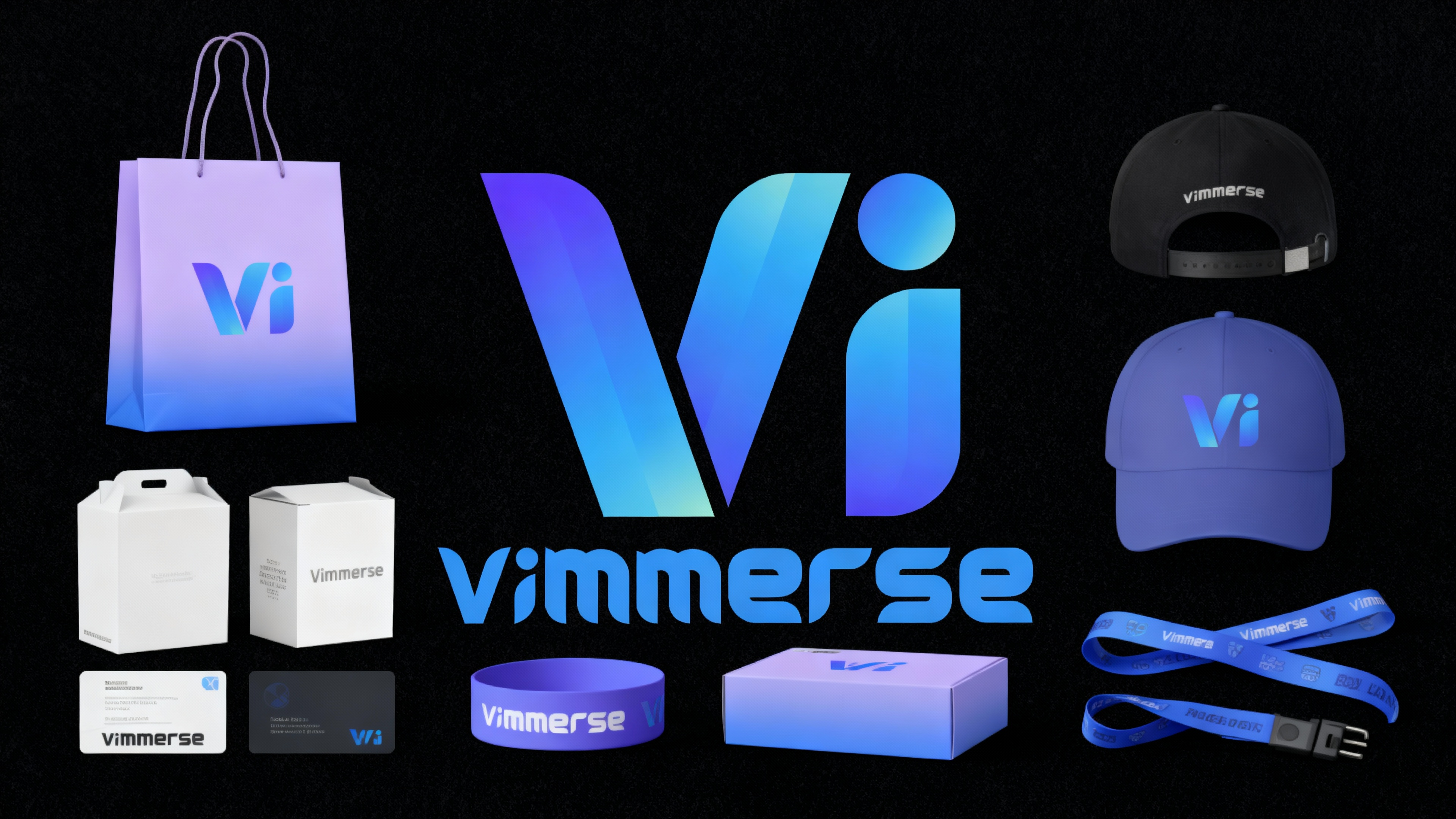
Refer to this logo, create a set of visual designs for an AI video brand named "Vimmerse". The products include packaging bags, hats, cards, wristbands, cartons, lanyards. The main visual colors are mauve and blue, with a simple and modern style.
Result: (see a result in public page)
Seedream 5
Seedream 5 is engineered for ultra-realistic, high-precision image generation with strong material rendering, accurate lighting logic, and commercial-grade output quality. Prompts should include clear subject definition, environmental context, lighting direction, texture detail, lens logic, and realism controls — this helps the model avoid artificial, over-stylized, or plastic-looking results.
Seedream 5 Editing supports conversational natural language editing, style and color transfer between images, sketch-guided edits, and inpainting for adding, removing, or replacing elements. You can also teach it new transformations by providing before/after example pairs.
Tips
- Think like a commercial photographer
- Always define lighting direction
- Add texture details for realism
- Include subtle motion cues
- Preserve identity in Image-to-Image
- Change environment, not facial structure
- Keep composition intentional (clear focal point)
- Use cohesive color grading
- Control proportions and realism
- End with a quality enhancement block
Short Formula Version
Subject + Setting + Lighting + Mood + Action + Detail + Composition + Quality Flags
Example: Athletic founder standing in a modern training studio, soft side lighting, subtle dust in air, confident grounded stance, realistic fabric folds, shallow depth of field, ultra high resolution, high quality with realistic details, commercial photography realism, 4K.
Keywords
- Defined subject, structured environment, lighting direction, material detail, lens type, depth of field, texture clarity, identity preservation, realism control, commercial quality, color grading, physical light logic, imperfection cues.
Prompt Official Guide
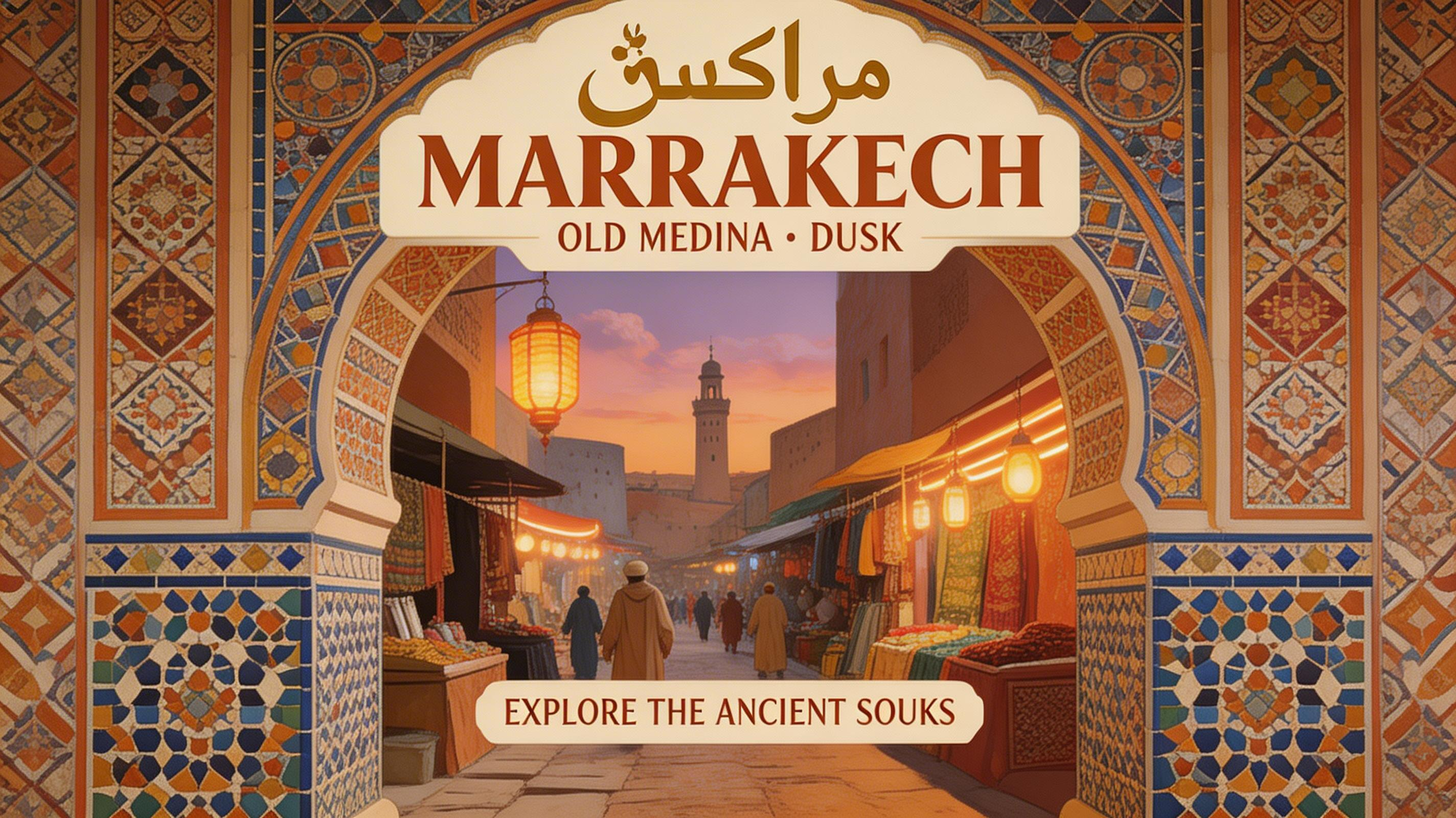
Prompt:
A vintage-style travel poster for Marrakech’s old medina at dusk, beautiful Arabic and English text, warm earthy tones and detailed mosaics, neon lighting accents.
Result: (see a result in public page)
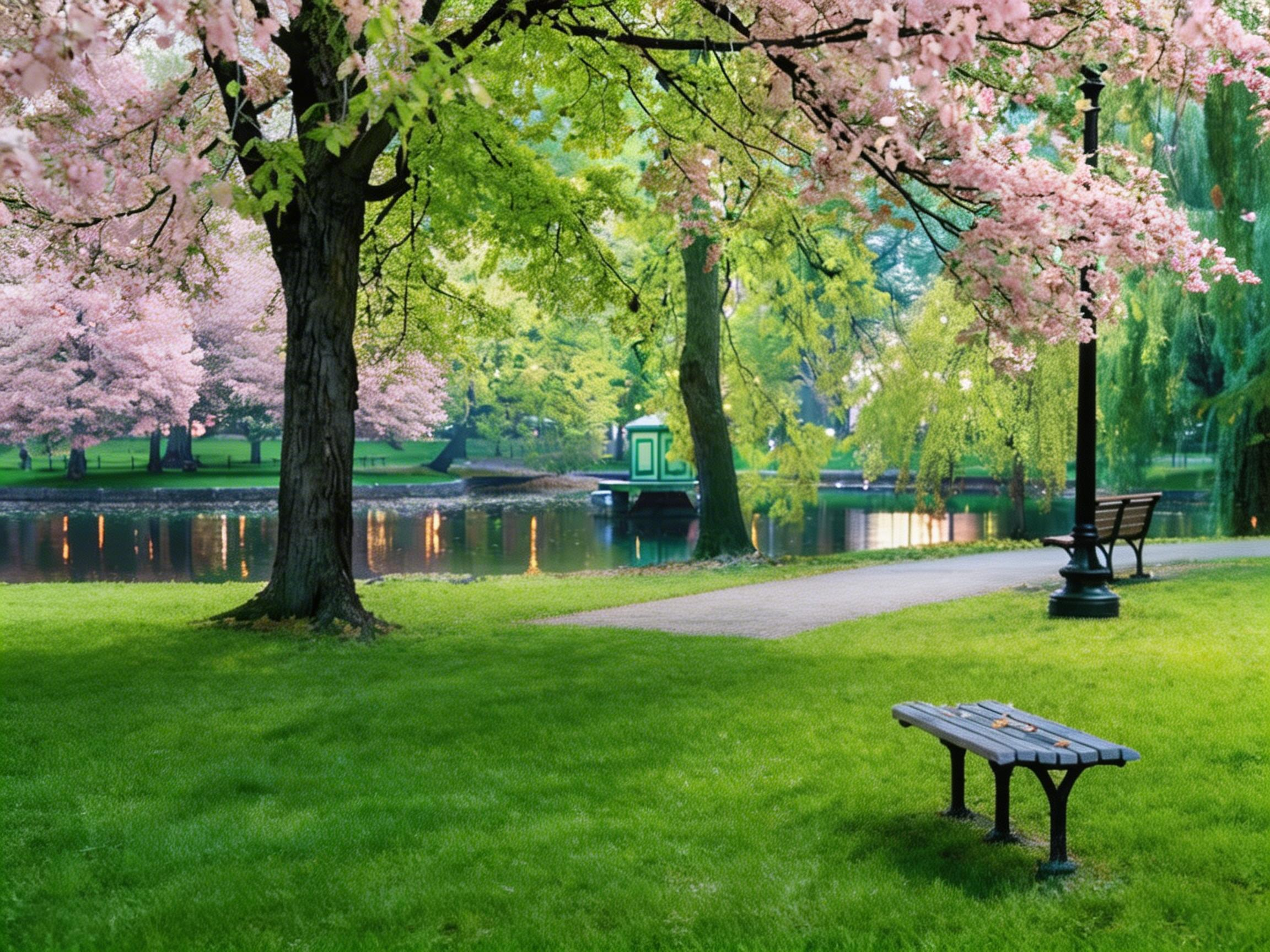
Prompt:
Change the original season of a photo — autumn leaves → blooming spring — with realistic lighting and texture adjustments.
Result: (see a result in public page)
Prompt:
Seamlessly place the athlete from image 1 holding and interacting with the protein product from image 2 inside a high-end performance environment inspired by the product’s material texture (carbon fiber walls, brushed metal surfaces, subtle reflective flooring). Maintain exact facial identity and body proportions of the athlete. Integrate realistic grip interaction with the product. Cinematic commercial lighting, controlled highlights on packaging, subtle depth of field, dynamic but premium fitness branding aesthetic. Ultra high resolution, high quality with realistic details, 4K commercial photography realism.
Result: (see a result in public page)
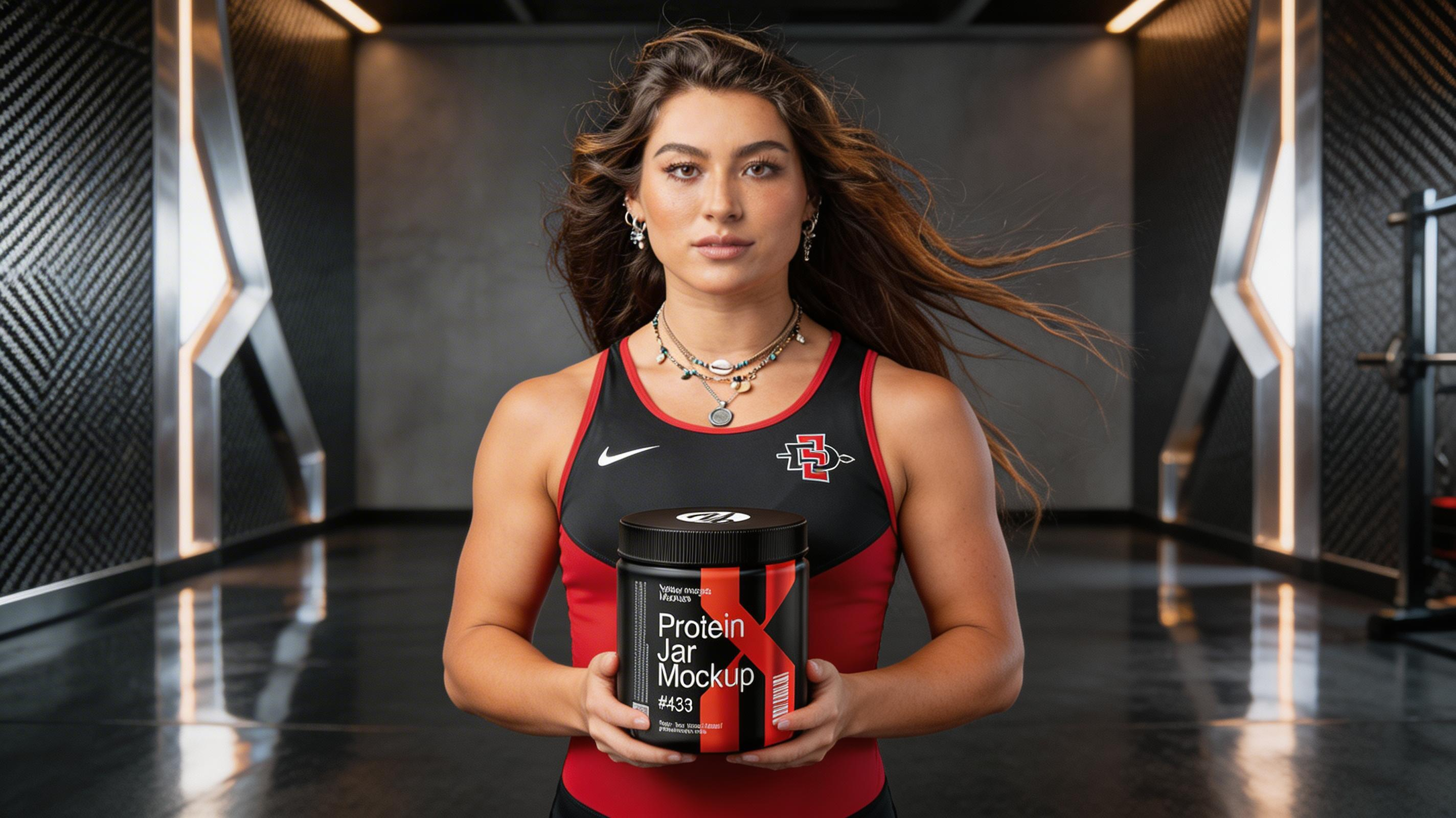
Nano Banana Pro / Nano Banana
Nano Banana Pro is Google’s advanced AI for creating and editing images. You can generate realistic, stylized, cinematic, or 3D visuals using text, images, or both. It’s perfect for social media visuals, product mockups, posters, and creative projects.
Here’s what you can do:
- 1. Text-to-Image
- Turn any description into a realistic or stylized image.
- Example: “A nano banana dessert on a marble plate, warm candlelight, luxury vibe.”
- 2. Image + Text Editing
- Upload an image and change or add anything. You can replace backgrounds, objects, or style.
- Example: “Take this banana photo and replace the background with a tropical sunset.”
- 3. Multi-Image Blending & Style Transfer
- Combine several images into a new scene or apply one image’s style to another.
- Example: “Blend this banana photo with a watercolor painting style.”
- 4. Step-by-Step Refinement
- Work gradually. Make small changes until the image is perfect.
- Example: “Make the shadows softer, then add subtle highlights.”
- 5. Text in Images
- Generate clear, readable text in images — perfect for logos, posters, or product labels.
- Example: “Logo: ‘Nano Banana’ in bold gold letters on a dark background, banana icon above.”
- 6. High-Quality, Realistic Output — Supports 2K or 4K resolution, studio-style lighting, and realistic textures.
- 7. Consistency Across Scenes — Keep the same person, object, or style across multiple images or edits.
- 8. Smart Object & Scene Edits — Replace objects, change lighting, or adjust camera angle without losing details.
How to Structure Your Prompt
- Style & Art Direction — Photorealistic, hyper-detailed, Pixar-style, anime, vaporwave, cyberpunk, watercolor, digital illustration
- Scene Description — Describe the environment, atmosphere, and mood
- Main Subject (Hero Element) — Who or what is the focus? Person, object, or animal
- Camera & Cinematic Controls — Lens type, angle, perspective, composition, focal length
- Lighting — Soft, backlit, golden hour, volumetric rays, neon glow
- Texture, Color & Material — Matte, glossy, metallic, pastel, or vibrant textures
- Optional: Negative Prompts — What to avoid: blur, artifacts, extra limbs, wrong anatomy
Tips for Writing Better Prompts
- Be specific: “a cat” → weak; “a fluffy orange British Shorthair kitten sitting on a marble countertop, soft morning light” → strong
- Use layered descriptions: combine mood, materials, and atmosphere
- Use cinematic language: AI responds well to film terms
- Define lighting: one of the most important factors
- Avoid overloading the prompt: too many instructions can confuse the model
- Include references if you want consistent objects or people across images
Prompt:
Create a hyperreal close-up of a face with neon reflections and glossy skin texture.
Result: (see a result in public page)
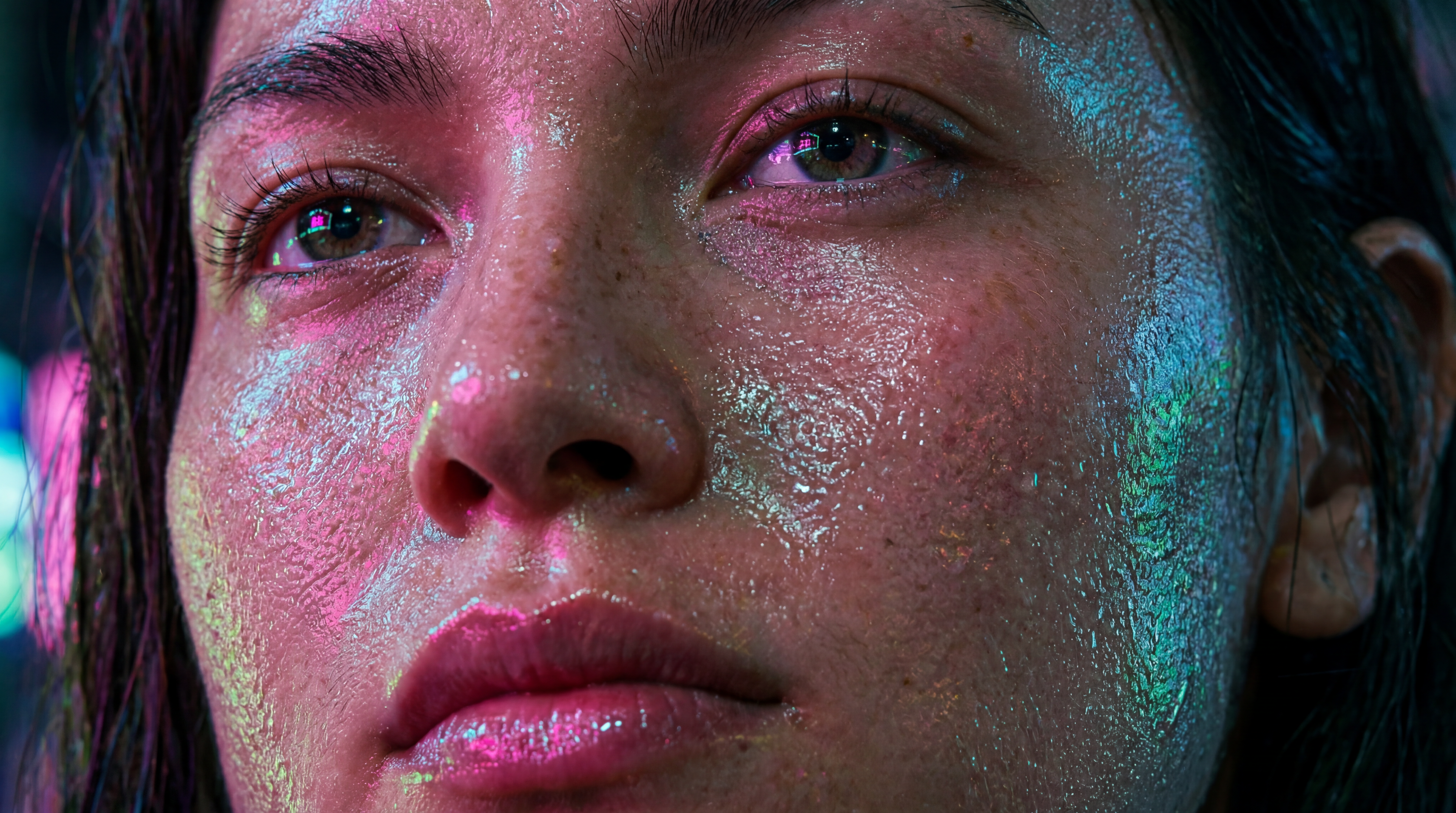
OpenAI (GPT Image)
OpenAI models respond best to clear, structured instructions. This guide will help you craft prompts for text, image, and multi-modal generation, so you can achieve consistent, high-quality results every time.
Your prompt is the instruction that guides the AI. The more precise and detailed your input, the better the output. Think of it as giving the AI both the task and the context.
Core Prompt Structure
A strong prompt usually includes:
- Task → What you want (write, summarize, generate an image, translate, etc.)
- Subject → Who/what it's about
- Style / Tone → Professional, playful, cinematic, etc.
- Format → Bullet points, blog post, table, list, etc.
- Details → Mood, setting, perspective, length, constraints
Example Prompts
Text Example
- ❌ "Summarize this text."
- ✅ "Summarize the following text in 3 bullet points, under 150 words, tone: professional."
Image Example
- ❌ "A wolf in a forest."
- ✅ "Photorealistic grey wolf standing in a misty forest at dawn, golden light, shallow depth of field, 16:9 aspect ratio."
Quick Tips at a Glance
- Always define task + style + format
- Use specific adjectives for images
- Refine instead of overloading prompt
- Generate multiple variations to compare
- Avoid contradictions (e.g. "minimalist but also highly detailed")
Prompt:
Fairy sitting on a glowing mushroom, enchanted forest, magical atmosphere
Result: (see a result in public page)
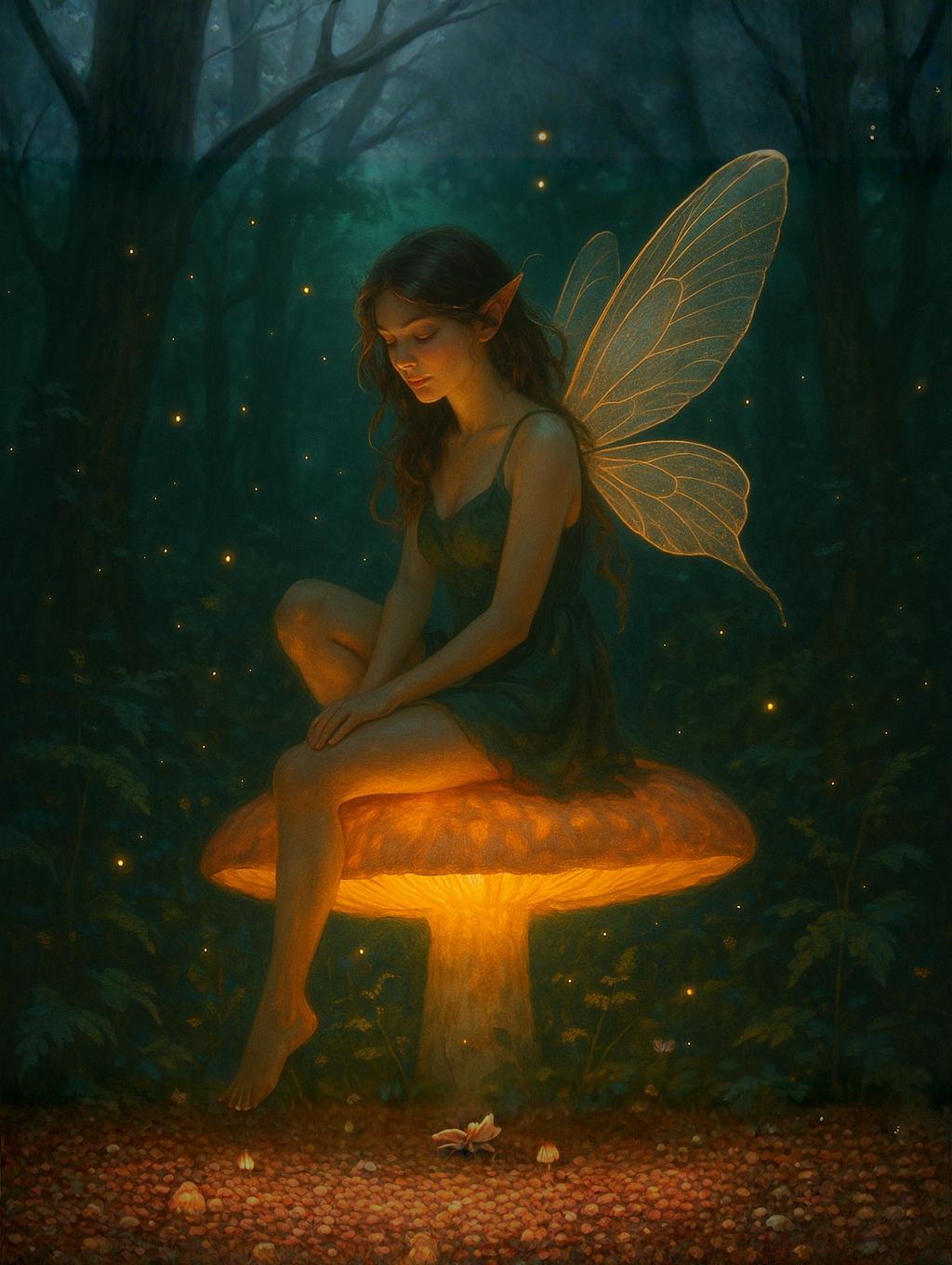
GPT Image 2
GPT Image 2 is OpenAI’s latest state-of-the-art image generation model, designed for high-quality, accurate, and production-ready visuals. It goes beyond traditional AI image tools by thinking before generating, resulting in better structure, layout, and realism.
OLD: Basic visuals, weak text rendering, limited control.
NEW: Accurate text, better realism, smarter prompts, production-ready outputs.
Why GPT Image 2 is a Major Upgrade
- “Thinking” Before Generating — Unlike older models, GPT Image 2 performs a reasoning step before creating images, improving composition, layout accuracy, and prompt understanding.
- Near-Perfect Text Rendering — Accurate text inside images (logos, UI, ads) across multiple languages. Ideal for ads, thumbnails, product labels, and UI mockups.
- High-Fidelity & Photorealism — Realistic lighting, textures, and materials with strong product rendering. Great for e-commerce visuals, marketing creatives, and cinematic thumbnails.
- Multi-Image + Reference Control — Supports multiple reference images (up to ~16) and maintains character / product consistency.
- Flexible Resolution (Up to 4K) — 1K / 2K / 4K output, any aspect ratio (portrait, landscape, square).
- Strong Instruction Following — Follows prompts more precisely and handles complex scenes easily.
Best Use Cases
- Product ads & e-commerce visuals
- Social media creatives
- Thumbnails with text
- UI / app mockups
- Posters & marketing designs
- Storyboards & cinematic scenes
Prompt Structure
[Main Subject] + [Environment / Scene] + [Style / Look] + [Lighting] + [Camera / Composition] + [Text (if needed)]
Key Prompting Rules
- Be specific (no vague prompts)
- Describe text in quotes → "like this"
- Mention lighting & camera
- Keep 1 clear idea (no chaos)
- Avoid too many styles in one prompt, random keywords, or overloading details
Prompt Official Guide
Prompt:
Premium beverage poster, modern minimalist aesthetic, soft daylight studio lighting, a glass of iced blueberry matcha placed on a textured stone surface, visible condensation, fresh blueberries scattered around, creamy layered texture clearly visible large bold headline text: "ZENCHA" subhead: "PURE MATCHA. CALM ENERGY." highlight text: "NOW OPEN IN SOHO, NYC" clean editorial layout, balanced negative space, muted green and purple tones, soft shadows, luxury branding style, ultra realistic product photography, magazine quality, 4k
Result: (see a result in public page)
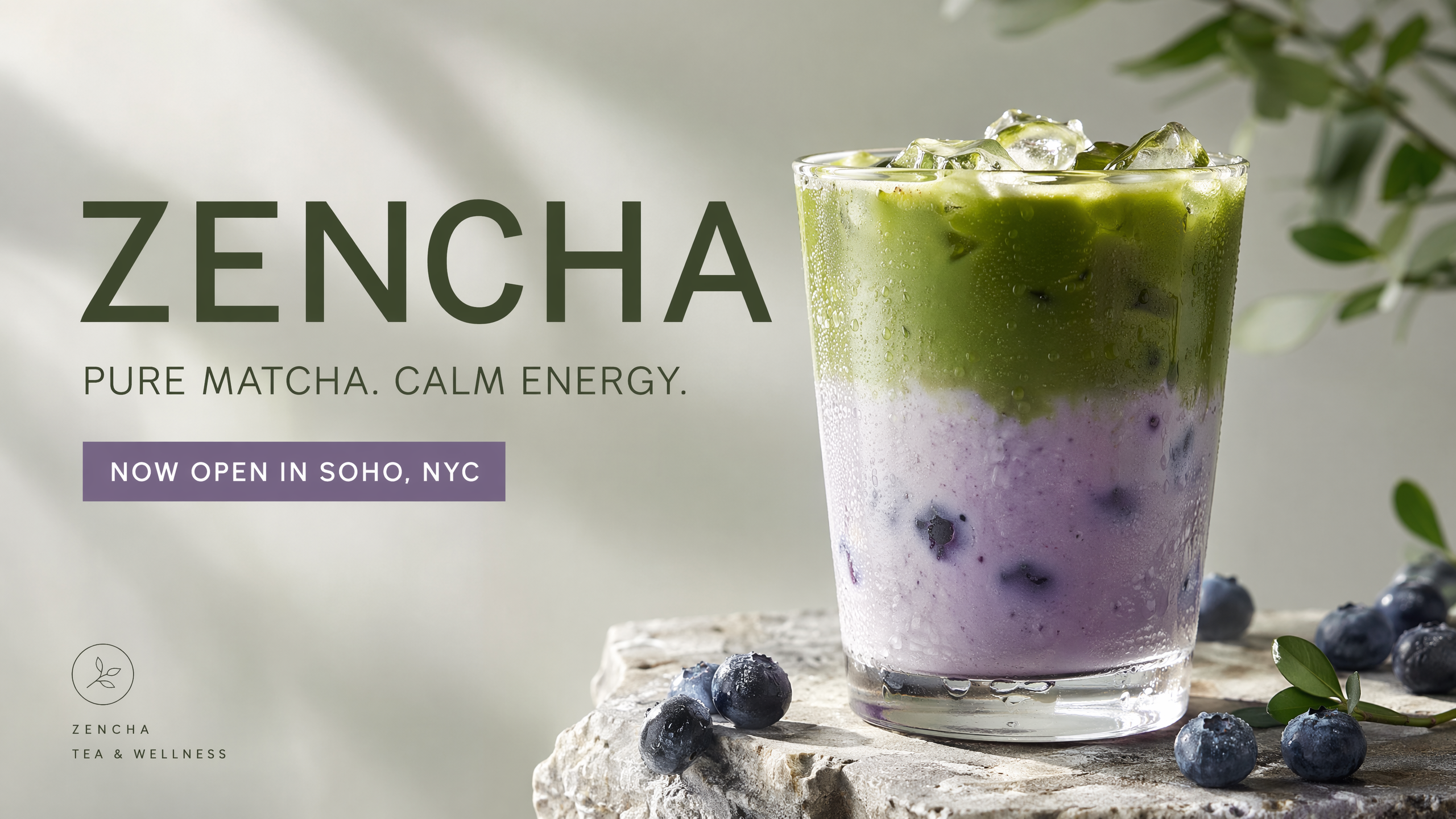
Flux 2 (FluxKontextPro)
Flux 2 is the latest state-of-the-art Text2Image, Image2Image, and Image Elements generation model integrated across all Vimmerse apps. It replaces all previous "Pro" versions of Flux and brings major improvements in visual quality, adherence to style, object consistency, lighting, and compositional control.
How Flux 2 Works
- Describe Only What You Want — Flux 2 follows instructions very literally. Avoid extra descriptions of things you don't want.Example: "Crisp product shot on a matte surface, clean lighting, smooth background."
- Use Compact, Direct Style Tags — Flux 2 prefers short, strong stylistic labels. Use one or two style tags only — too many creates conflict.
- Anchor the Scene With Specific Composition — Flux 2 responds extremely well to camera and framing cues.
- "Center-framed hero object"
- "Low-angle shot"
- "Symmetrical composition"
- Material & Surface Precision — Flux 2 is highly sensitive to textures. Specify surface material, color palette, and lighting behavior.Example: "Reflective metallic surface with soft specular highlights, charcoal-black palette."
- Control Lighting Intentionally — Lighting can dramatically change the output.
- "Soft diffused lighting"
- "Studio three-point lighting"
- "Golden-hour backlight"
- HEX Color Control — Flux 2 fully supports precise hex color values for exact branding and product accuracy.
- "Product label highlight in #FF5733"
- "Warm tone accents in #D4A373"
- Typography & Design — FLUX.2 generates clean typography, product marketing materials, and magazine layouts.Example: "product advertisement, ‘Ultra-strong titanium’ headline, ‘Shielded in a strong titanium frame, your Galaxy S25 Ultra always stays protected’ subtext, close-up of phone edge showing titanium frame, dark gradient background, clean minimalist tech aesthetic, professional product photography"
- Multilanguage Prompting — Flux 2 supports multi-language prompting. You can write prompts in Hindi, English, Korean, Japanese, Arabic, Spanish, and more.
- Korean: "따뜻한 조명 아래 고급 스킨케어 병의 스튜디오 샷."
- Spanish: "Retrato cinematográfico con luz suave y detalles realistas."
- Character & Object Control — For Image-to-Image or Image Elements prompts, be specific:
- "Keep face identical"
- "Preserve hairstyle"
- "Match object proportions"
Prompt Official Guide
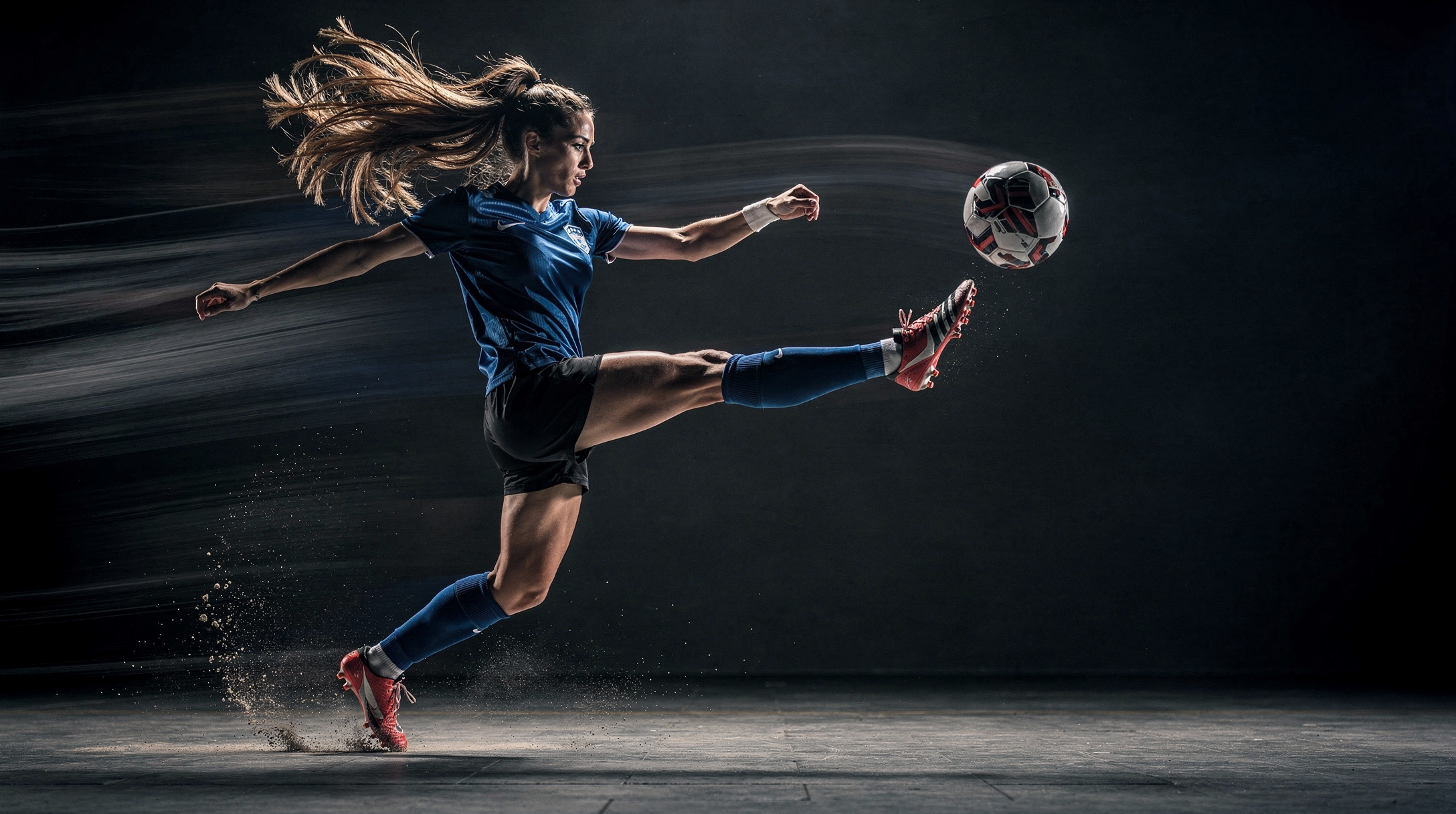
Prompt:
Female athlete frozen mid-kick, flowing hair, powerful motion streaks trailing from limbs, soccer ball suspended in mid-air, dramatic side and rim lighting, dark sports studio background, subtle haze and dynamic dust, cinematic commercial photography style, crisp textures, shallow depth of field, high-resolution marketing-ready shot
Result: (see a result in public page)
Audio Tool-Specific Insights
Native Audio
Beside AI video tools, you can also generate native sound effects and lip sync for the videos to have more immersive experience. You can simply add “Audio:” followed by the desired sound to the prompt itself (Make sure to have Audio turned on in the Apps or via the API).
Prompt:
A woman sitting on a couch with a view of the sea and birds. Audio: The sound of sea waves crashing.
Result: (see a result in public page)
Text To Speech
Elevenlabs V3 TTS
Prompt Official Guide
Lyria 2 AI Music
Prompt Official Guide